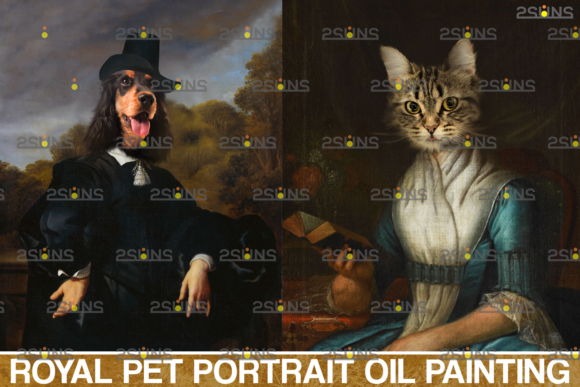
The Digital Renaissance: Transforming Pet Photography with Royal Pet Portrait Templates Vol.12
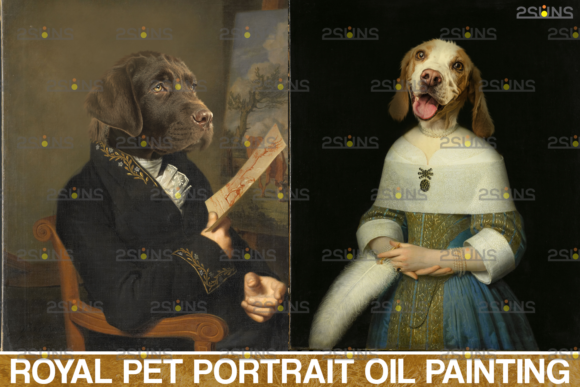
The bond between humans and their pets is timeless, and the desire to immortalize that bond through art is a practice that dates back centuries. Historically, commissioning a formal oil portrait of a pet required hiring a skilled artist, purchasing expensive supplies, and waiting weeks for the result. Today, the intersection of digital technology and artistic tradition has democratized this process. Among the tools driving this shift are high-quality digital assets, specifically the Royal Pet Portrait Templates Vol.12. This collection represents a significant leap in digital compositing, allowing photographers, designers, and hobbyists to create regal, museum-quality pet portraits using standard photo editing software.
Deconstructing the Asset: What is Included in the Set?
Understanding the components of the Royal Pet Portrait Templates Vol.12 is essential for anyone looking to integrate these tools into their workflow. The utility of a digital template lies in its flexibility and the quality of its raw materials. This specific collection is designed to be lightweight yet powerful, featuring a zip archive size of just 3 MB, making it accessible even for those with limited storage or slower internet connections.
The core of this package consists of three distinct elements, each serving a specific purpose in the creation of a digital backdrop:
- High-Resolution JPGs: The set includes two JPG files. These serve as the digital background layers. Because these images are rendered at a resolution of 300 DPI (dots per inch), they are suitable not only for web display but also for high-quality physical printing. This ensures that the final product retains its clarity and depth, mimicking the texture of a real canvas.
- The ABR Fur File: Perhaps the most unique component is the 1 ABR fur file. An ABR file is a Photoshop Brush file. This specific brush is engineered to replicate the texture of fur. When compositing a pet into a new background, the edges where the animal meets the backdrop are often the most difficult to perfect. This specialized brush allows the artist to blend the pet’s natural fur with the painted style of the background, creating a seamless transition between the photograph and the oil portrait pet aesthetic.
Technical Specifications and Compatibility
The accessibility of the Royal Pet Portrait Templates Vol.12 is a major selling point. The creators, 2SUNS, have designed these templates to be compatible with a wide array of software. While Adobe Photoshop is the industry standard for this type of work, the templates are functional in any software that supports layer-based editing.
This broad compatibility opens the door for various users:
- Adobe Photoshop & Elements: The primary target for these templates. Users can fully utilize the ABR brush file and the layer masks typically found in such templates.
- Paint Shop Pro: A popular alternative for Windows users that handles layers and JPGs effectively.
- PicMonkey: An online editor that allows for layering, making these templates accessible to users who do not wish to install heavy desktop software.
- Lightroom Considerations: It is important to note that while Lightroom is a powerful photo management and editing tool, it does not natively support layers. Users who prefer Lightroom must utilize plugins that allow for layer manipulation or export their images to a layer-compatible editor to apply the Photoshop templates.
The 300 DPI resolution is a critical technical feature. In the world of digital printing, resolution determines the sharpness of an image. A pet painting created at 72 DPI might look good on a screen, but it will appear pixelated and blurry when printed. By providing assets at print-ready quality, the Royal Pet Portrait Templates Vol.12 ensures that the final artwork can be printed on canvas, paper, or merchandise without loss of quality.
The Art of the Oil Portrait Pet Aesthetic
The "Oil Portrait" style is a trending aesthetic in pet photography. It moves away from the candid, "snapshot" style of modern photography and embraces the lighting, composition, and color grading of classical European art. This style often features rich, dark backgrounds, dramatic lighting (chiaroscuro), and a focus on the subject's expression.
Using the Royal Pet Portrait Templates Vol.12, a creator can transform a standard photo of a golden retriever into a masterpiece that looks like it belongs in a Victorian manor. The process involves more than just a background swap; it requires a conceptual understanding of how light interacts with the subject.
When applying a digital backdrop, the user must consider the direction of the light source in the original pet photo. If the pet is lit from the left, the background must also imply a light source from the left. The textures provided in the Vol.12 set are designed with generic lighting that can be adapted, but the user's skill in masking and blending determines the realism of the final image.
Workflow Integration: From Snapshot to Masterpiece
For professionals and hobbyists alike, efficiency is key. The inclusion of Photoshop templates streamlines the editing process significantly. Instead of building a composition from scratch, the artist starts with a pre-designed foundation.
A typical workflow using these assets might look like this:
- Preparation: The photographer selects a high-quality image of the pet. Ideally, the pet should be photographed against a simple background (green screen or solid grey) to make masking easier, though skilled editors can extract subjects from complex backgrounds.
- Masking: The pet is separated from its original background. This is the most labor-intensive step. Precision here is vital to ensure the fur looks natural.
- Placement: The extracted pet is placed onto the digital background provided in the Royal Pet Portrait Templates Vol.12. The pet is scaled and positioned to fit the composition of the frame.
- Blending and Texturing: This is where the ABR fur file becomes invaluable. The artist uses the fur brush to paint over the edges of the mask. This softens the cut-out look and helps the pet blend into the painted environment. Additionally, applying a "canvas" texture overlay to the entire image helps unify the photograph of the pet with the painted background.
- Color Grading: Finally, color adjustments are made to ensure the pet matches the tone of the background. This might involve deepening the shadows or warming the highlights to create that classic oil portrait pet look.
Use Cases and Creative Applications
The versatility of Royal Pet Portrait Templates Vol.12 extends beyond personal art projects. These assets have practical applications in various creative industries.
Professional Pet Photography Studios
For studio owners, offering "Royal Portraits" is a value-added service. A client brings their dog in for a standard photoshoot, and the photographer offers a premium package that includes a digitally painted portrait. This allows the studio to charge a higher price point for the session and the resulting prints. The speed of using Photoshop templates means the photographer can deliver the final product quickly, increasing client satisfaction and turnover.
Custom Pet Merchandise
Print-on-demand businesses are booming. Creators can use these templates to design unique merchandise such as tote bags, t-shirts, or coffee mugs featuring a pet's face in a royal setting. The 300 DPI resolution of the assets ensures that the designs print crisply on physical products.
Digital Artists and Illustrators
Illustrators who work with mixed media often look for high-quality textures. The digital backdrop elements in this set can be used as layers in digital paintings to add depth and realism. The fur brush is a tool that can be used across multiple projects, not just the ones utilizing the specific backgrounds in the pack.
Gift Giving
For the average consumer, these templates offer a way to create a heartfelt, personalized gift. Turning a beloved family pet into a "King" or "Queen" using a pet backdrop is a popular trend for holiday gifts, pet birthdays, or memorial portraits for pets that have passed away.
Considerations for High-Quality Results
While the tools provided in the Royal Pet Portrait Templates Vol.12 are high quality, the final output depends heavily on the source material and the user's editing skills. Here are a few considerations to keep in mind:
- Source Image Quality: The resolution of the pet photo should ideally match or exceed the 300 DPI of the background. If a low-resolution phone photo is stretched to fit a high-resolution background, the pet will look blurry against a sharp backdrop, breaking the illusion.
- Color Harmony: Not every pet photo will match every background immediately. Color theory plays a role here. A dog with warm orange fur might look best against a background with warm golds and browns, while a grey cat might pop against a deep blue or burgundy digital backdrop.
- Fur Detailing: While the ABR brush helps, users should zoom in closely when masking. Large, jagged edges will ruin the effect. Taking the time to refine the mask around the ears and whiskers is what separates an amateur edit from a professional pet painting.
The Evolution of Digital Backgrounds
The concept of the digital background has evolved significantly. Early digital backgrounds were often flat and unrealistic. Modern assets, like those found in the Vol.12 collection, are designed with depth, perspective, and lighting cues that mimic real-world environments. They are not just flat images; they are environments waiting for a subject.
This evolution allows for greater storytelling. A pet placed in a royal setting tells a story of status, personality, and humor. It elevates the pet from a mere animal to a character. The Royal Pet Portrait Templates Vol.12 specifically targets this narrative-driven approach to pet photography.
Conclusion on Utility
The Royal Pet Portrait Templates Vol.12 serves as a bridge between amateur photography and professional digital art. By providing high-resolution JPGs and a specialized ABR fur brush, 2SUNS has equipped creators with the necessary components to produce stunning oil portrait pet imagery. Whether for professional studio use, merchandise creation, or personal enjoyment, these Photoshop templates offer a robust solution for anyone looking to explore the regal side of pet portraiture. The compatibility with various software platforms ensures that this creative avenue is open to nearly everyone, regardless of their preferred editing suite.