Professional IT Course Introduction Presentation Templates
A strong introduction sets the stage for the entire learning experience. In the information technology field, where concepts can be complex and audience attention spans are limited, the first presentation is a critical opportunity to establish credibility and spark engagement. The IT Course Introduction - PPT Templates are designed specifically for this purpose, providing a structured yet flexible framework for educators, trainers, and professionals to communicate the value and scope of their technical content effectively.
Understanding the Core Design Philosophy
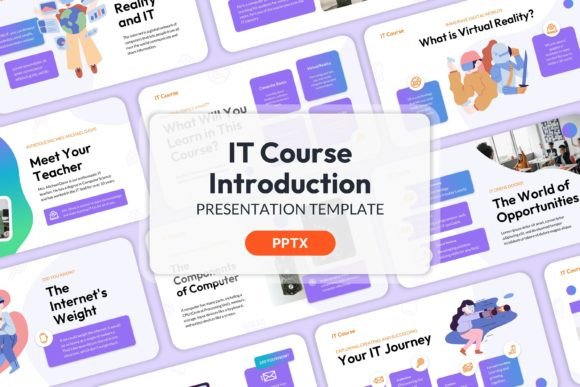
This template is not merely a collection of slides with placeholder text. It is a professional creative PowerPoint design built on a foundation of clarity and adaptability. The design uses a clean, modern aesthetic that avoids visual clutter, ensuring that the focus remains on your content and message. The color scheme is carefully selected to convey professionalism and trust, which is essential when introducing subjects like programming, cybersecurity, data analysis, or network infrastructure.
The inclusion of master slides is a fundamental feature. By editing the master, you ensure global consistency in fonts, colors, and layouts across all twenty slides. This is crucial for maintaining a polished, organized appearance that reflects well on your institution or brand. The fully organized structure guides you logically from a title slide through course objectives, curriculum highlights, instructor introductions, and a call to action, making the preparation process more efficient.
Practical Applications for Diverse Professionals
The utility of this template extends far beyond a traditional classroom setting. Its design supports a variety of professional contexts where introducing an IT-related offering is key.
- For Educators and Trainers: Use it to outline a new semester-long course, a weekend workshop, or a corporate training module. The structured slides help you present the learning outcomes, syllabus, and assessment methods in a clear, digestible format for students or trainees.
- For Entrepreneurs and Startups: If your startup offers an IT solution, SaaS product, or technical service, this template can be adapted for investor pitches or client onboarding presentations. Introduce your product's technical foundation, the problem it solves, and the team behind it with a professional flair.
- For Freelancers and Consultants: A freelancer proposing a website development project or a consultant outlining a digital transformation strategy can use these slides to present their approach, timeline, and methodology. It builds client confidence from the very first meeting.
- For Marketing and Sales Teams: When launching a new software tool or an IT-related service package, marketing professionals can craft a compelling introduction for webinars, sales calls, or partner briefings that highlights key features and market benefits.
Maximizing Impact with Simple Customization
The template's power lies in its adaptability. The image placeholder feature is particularly valuable. Since the zip file contains no images, you have the freedom to insert visuals that are perfectly tailored to your audience and subject matter.
For a course on cloud computing, you might use diagrams of server architectures or icons representing scalability and security. For a web development introduction, screenshots of clean code or interface designs can make the content tangible. The key is to choose images that are high-quality, relevant, and reinforce your key points without overwhelming the text.
Maintain clarity by using the template's organized layout as a guide. Each slide should communicate one primary idea. Use the bullet points sparingly; instead, let concise headings and brief explanatory text do the work. The consistent color scheme and fonts, enforced by the master slides, will tie everything together, allowing your content to be the star.
Creative Directions and Project Ideas
Think of this template as a starting point for various presentation styles:
- The Traditional Syllabus Overview: A straightforward, detailed walk-through of the course schedule, topics, and requirements. This is ideal for academic settings where transparency and detail are paramount.
- The Problem-Solution Narrative: Frame your IT course as the solution to a common industry challenge. Start with the problem (e.g., "Businesses struggle with data breaches"), introduce the course as the knowledge solution, and end with the outcome (skilled professionals who can protect systems).
- The Skill Pathway Map: Use the slides to visually map out a learning journey. You could show beginner, intermediate, and advanced modules, or connect different IT skills (like networking, security, and programming) to show how the course builds comprehensive expertise.
- The Testimonial-Driven Introduction: Dedicate a few slides to quotes or short case studies from past students or industry partners who have benefited from similar training. This social proof can be a powerful motivator for prospective learners.
Ensuring Your Presentation Succeeds
A great template provides the structure, but the content and delivery make the connection. Here are a few final recommendations:
Know Your Audience's Baseline: Are you introducing a course to complete beginners or experienced professionals looking to upskill? Tailor your language and depth of technical detail accordingly. Avoid jargon when speaking to newcomers, and dive into specifics for a knowledgeable audience.
Highlight Tangible Outcomes: People invest time in learning for results. Clearly state what attendees will be able to do after completing the course. Will they build a website, pass a certification exam, or implement a secure network? Use action-oriented language.
Practice with the Template: Familiarize yourself with the slide transitions and layout before presenting. This ensures a smooth delivery and helps you gauge timing. The professional design will boost your confidence, allowing you to focus on engaging with your audience.
The IT Course Introduction - PPT Templates offer a practical, professional foundation for anyone needing to present a technical educational offering. By leveraging its organized structure and customizable features, you can create a compelling introduction that informs, inspires, and effectively promotes your course to the next level.