Evaluating Cutiet Instagram Templates for Your Social Media Strategy
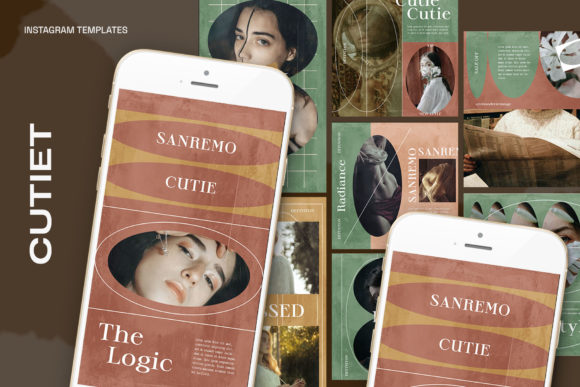
In the competitive landscape of social media marketing, visual consistency and high-quality imagery are essential for growth. Many content creators and businesses utilize pre-made design assets to streamline their workflow. Among these assets, Cutiet Instagram Templates represent a specific category of .PSD files designed to offer a quick, professional starting point for Instagram posts. Understanding the technical specifications and practical application of these templates is necessary for determining if they align with a user's specific creative needs.
Technical Specifications and File Structure
The foundation of evaluating the Cutiet Instagram Templates lies in their technical composition. The package consists of a 1.13 PSD File, which is a native file format for Adobe Photoshop. This format ensures that layers, effects, and adjustments remain editable, distinguishing it from flattened image formats like JPEG or PNG.
A critical component of the evaluation is the resolution and color profile. These templates are configured at 300 DPI and utilize the RGB color mode. While 300 DPI is standard for print, it is also beneficial for maintaining high fidelity on high-resolution digital screens. The RGB color space is the standard for digital displays, ensuring colors appear vibrant on mobile devices and monitors. However, users intending to print these designs on physical media may need to verify color gamut limitations inherent to RGB profiles.
The file offers two specific canvas dimensions: 1200 x 1200 px and 1920 x 1080 px. The square format (1200x1200) is the traditional standard for Instagram feeds, while the landscape format (1920x1080) is ideal for Instagram Reels, Stories, or cross-platform posting to sites like Facebook and Twitter. This dual-resolution offering provides versatility for users managing multiple content formats.
Workflow Efficiency and Usability
When evaluating design tools, ease of use is often a deciding factor. The Cutiet Instagram Templates are marketed with a focus on Smart Object technology. This feature is designed to simplify the process of image insertion. The workflow described involves a double-click action on the image layer, placing the user's image, and saving (CTRL S). This method allows the template's pre-set effects, shadows, and sizing to automatically apply to the new image.
For users with intermediate Photoshop skills, this workflow is standard and highly efficient. It eliminates the need to manually adjust perspective or masking for every post. However, it is important to note that these templates require Adobe Photoshop to function. Users without access to this specific software will not be able to utilize the Smart Object features.
Furthermore, the package offers editable text via the text tool. This allows for complete customization of headlines, captions, and calls to action. The ability to change fonts, sizes, and colors ensures that the templates can be branded to match specific style guides. It is important to note that while the design elements are included, the model is not included in the file. Users must supply their own photography or stock imagery to populate the templates.
Strategic Fit and Content Goals
Determining whether Cutiet Instagram Templates are the right choice depends on the user's specific content strategy. These templates are generally a strong fit for individuals or businesses that require a consistent aesthetic but lack the time or resources to design from scratch every day.
- Brand Consistency: If a user needs to maintain a uniform look across their feed, using a set of templates helps create a cohesive grid. The consistent typography and layout structure provided by the templates support brand recognition.
- Speed of Production: For users managing daily content, the Smart Object workflow significantly reduces production time. Instead of building a layout, the user only needs to swap the image and update the text.
- Technical Requirement: This product is ideal for users who are comfortable with Adobe Photoshop. The learning curve is minimal for those familiar with layer management and Smart Objects.
However, there are scenarios where these templates might not be the optimal solution. Users who rely exclusively on mobile editing apps (such as Lightroom Mobile or Canva) may find the .PSD file format cumbersome, as it requires a desktop environment. Additionally, if a user requires unique, one-of-a-kind designs for every single post, a rigid template system may feel restrictive over time.
Decision-Making Insights
When comparing Cutiet Instagram Templates to other market options, buyers should weigh the specific technical inclusions against their workflow.
The inclusion of 1200 x 1200 px and 1920 x 1080 px sizes is a practical advantage, covering both feed posts and video/story content. Some template packs only offer square formats, requiring users to manually resize for Reels or Stories. The presence of both sizes in this pack adds value for comprehensive content planning.
However, the requirement to source a model separately is a key consideration. Users must have a library of their own photos or access to stock photography subscriptions. The templates serve as a frame or layout; the content itself must be supplied by the user.
Ultimately, the decision to use these templates should be based on a balance between creative control and efficiency. If the goal is to produce high-quality, professional-looking Instagram content rapidly using Photoshop, the Cutiet Instagram Templates offer a structured solution. If the goal is to create complex, animated graphics or to edit entirely on mobile devices, alternative tools may be more appropriate.